


US Breaking News: Local & News
4.58.05K Reviews
App Specs
- Version
- 13.0.2
- Updated On
- License
- Free
- Downloads
- 10,000,000+
- Developer
- Safe Apps Inc
- Categories
- News & Magazines
- Platform
- Android, iOS
Screenshots

 Analysis by AppCompare
I look for a news app that helps me get oriented quickly, not one that turns every spare minute into an endless scroll. US News: Breaking News & Local is aimed at that everyday need: a phone-based way to keep an eye on national headlines and nearby stories. Its appeal is clearest when I want a quick scan of what may affect my day, while its limits matter if I need deep reporting, a carefully controlled reading list, or a single publication’s point of view.
A quick briefing, with local context
The useful promise here is the mix of US-wide coverage and local news in one place. Those two levels serve different purposes: national stories help me understand the bigger picture, while local coverage can make a difference to plans, commutes, and conversations close to home. Rather than opening several publisher apps just to see what is happening, I can use one news app as a starting point and decide which stories deserve more attention.
That distinction is worth keeping in mind. A fast headline feed is good for awareness, but a headline is not the same thing as a full understanding of a complicated story. I treat the app as a front door to current events, not as a substitute for checking the reporting behind an important claim. When a story could affect a decision, I read beyond the alert and compare coverage rather than letting a short notification stand in for context.
Who will get the most from it
I can see this working well for someone who wants a practical daily check-in: a commuter scanning local developments before leaving, a busy reader looking for a national overview between tasks, or someone who would rather browse a combined feed than jump between multiple news sites. The app is free, so trying it does not require a purchase, and its Everyone age rating makes it broadly suitable for general audiences. Safe Apps Inc is the developer.
It is less compelling for readers who already follow a handful of trusted local reporters or prefer a newspaper’s carefully edited front page. Those readers may value a publication’s consistent editorial voice more than the convenience of gathering different stories together. I would also steer away from relying on any one quick-news feed for specialist subjects: when a topic needs technical detail, original documents, or sustained investigation, a dedicated source is a better next step.
Your Personal News Hub
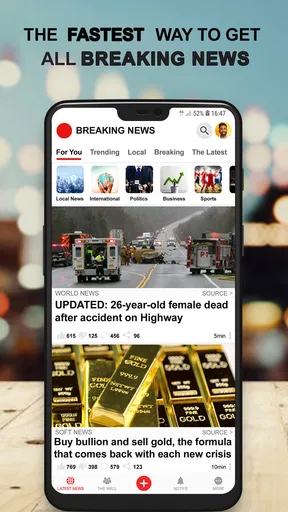
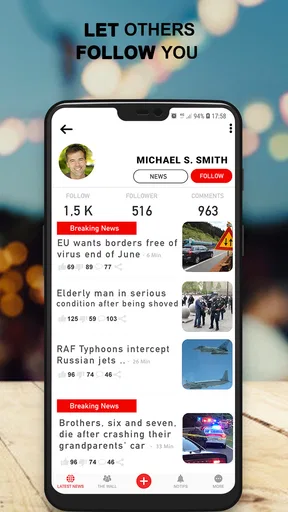
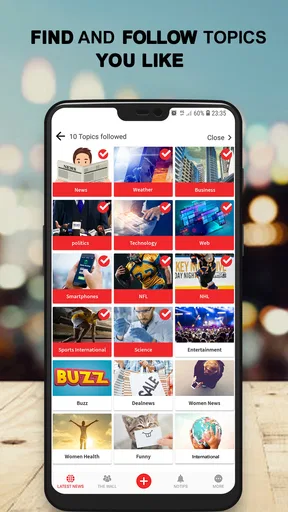
As soon as I opened the app, I was greeted with a clean and intuitive interface. It’s like the app knows exactly what you’re in the mood for. The first thing you’ll notice is how everything is neatly categorized. From national headlines to local stories, you can customize your feed to focus on what matters to you. The app even includes sections for entertainment, sports, and health, making it a one-stop-shop for all your news cravings.
Real-Time Updates
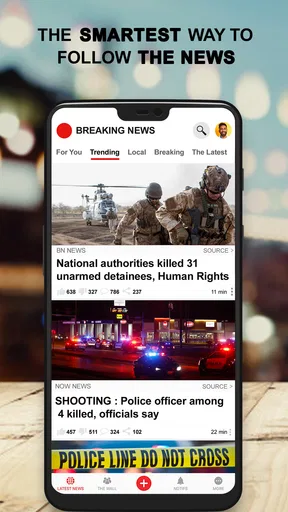
One of the standout features of US News: Breaking News & Local is its real-time updates. You get notifications as soon as breaking news hits the airwaves. And let me tell you, this feature is a game-changer if you’re someone who likes to stay ahead of the curve. I was particularly impressed with how quickly the app pushes out updates. It’s faster than some of the big-name competitors, and that’s saying something!
Worth Reading Before You Choose

Flipboard Shows What News Apps Must Do Beyond the Feed

Switching to Android Auto Means Rethinking Your Driving Routine

Google Calendar Makes a Crowded Week Easier to Manage

Ludo King Makes the Most of the Minutes Between Plans

Baby Panda World Brings Quick Play to Modern Phones, but Its Game Library Feels Busy

ESPN’s Live Game View Makes Following Close Games Easier
Local News at Your Fingertips
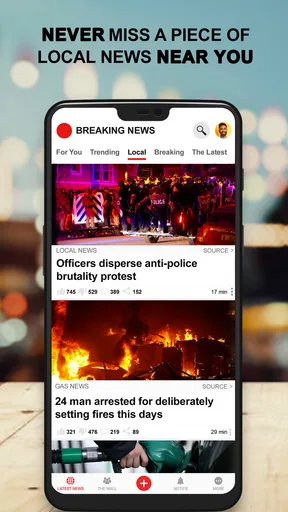
If you’re like me and love to stay informed about what’s happening in your own backyard, this app has you covered. The local news section is incredibly detailed. It picks up stories from various sources around your area, so you’re never out of the loop. I found this especially useful during my morning commute; I could catch up on all the local happenings without having to dig through multiple websites.
Making a local check-in useful
A small routine makes local coverage more practical than a rushed glance at headlines. I’d check it before leaving home, note any story that might affect the route or the day’s plans, then revisit only the items that actually matter. For example, if a local report signals a developing disruption, I would use it as a cue to check a current map or an official local update before changing course. News can flag an issue; it should not be treated as a live traffic or emergency service.
There is another useful habit: separate “near me” from “important to me.” A nearby story may be interesting without being urgent, and a major national story may deserve attention even when it has no immediate local effect. Keeping those questions distinct helps prevent a mixed feed from feeling like a stream of equally pressing alerts. I’d also revisit a developing story later rather than assuming the first alert contains the complete account.
Design and Usability
Now, let’s talk about the design. It’s not just functional; it’s downright enjoyable to use. The app’s design is sleek, and navigation is a breeze. You won’t find yourself lost in a maze of menus or struggling to find the story you want to read. Plus, the way stories are presented makes reading on a small screen comfortable, which is a big plus in my book.
In terms of usability, the app runs smoothly without any noticeable lag. I’ve used some apps where pages took forever to load, but that’s not an issue here. Everything is quick and responsive, which makes for a pleasant user experience.
Keeping notifications helpful rather than noisy
Breaking-news alerts can be valuable, but they can also interrupt work, meals, or sleep if every developing item feels equally urgent. I’d start by deciding what I actually need to know immediately and what can wait for a scheduled check-in. If the app’s notification controls let me narrow the stream, I’d use them; if not, I’d consider muting alerts and opening the feed at times that suit me. That is a sensible trade-off for anyone who wants the headlines without letting the phone dictate their attention.
When an alert arrives, I find it useful to read the accompanying story rather than reacting to the notification text alone. Early reports can change as more information comes in, and a push message is designed for speed, not nuance. For an urgent safety decision, I would look for direct guidance from the relevant local authority. The app can help me notice a developing event, but it is not a replacement for official instructions.
How it fits beside other news options
Compared with reading one newspaper app, this approach is more convenient for getting a broad mix of local and national stories, especially if I do not want to commit to one outlet’s front page. Compared with social media, a dedicated news feed gives me a more purposeful place to check headlines instead of mixing them with posts, arguments, and unrelated recommendations. The trade-off is that a news aggregator-style experience may not offer the depth, distinctive reporting, or editorial continuity I get from following a publication directly.
My practical approach would be to use this app for discovery, then open the original reporting when a story matters. That works particularly well for a reader who wants a quick overview but does not want to mistake breadth for completeness. If I were researching an issue in depth, tracking a specific beat, or looking for a publication’s analysis, I would go straight to a specialist source and use this app only as a supplementary scan.
What to expect before installing
It is a free news app in the News & Magazines category, and its audience reach suggests that it has found a substantial readership: it has over five million installs and an average rating of 4.5 from around one hundred thousand ratings. There are also around eight thousand written reviews. I would treat those figures as signs of broad use, not proof that every reader will get the same local coverage or prefer the same presentation.
The app first appeared on July 22, 2017, and its current version is 11.1.25. It requires Android 6.0 or later, which is useful to check if you are installing it on an older device. If your phone meets that requirement, the main decision is less about setup and more about whether a fast, combined feed suits your habits. I would try it as a lightweight briefing tool, then keep it only if its local and national mix is genuinely more convenient than the sources I already use.
When I would choose something else
I would skip this as my primary news source if I needed extensive investigative work, a strong point of view from a particular newsroom, or coverage tailored to a specialist subject. I would also choose a direct local publisher when I need its ongoing reporting and community knowledge, or an official source when I need instructions during an emergency. A general news feed can help me spot what deserves attention, but it cannot make every story equally detailed or equally authoritative.
There is a related trade-off in convenience: placing many topics in one feed can make discovery easier, but it also means I need to be deliberate about what I open and how long I spend browsing. I would use categories to keep the experience relevant rather than treating every section as a must-read. That simple boundary helps the app remain a quick briefing instead of becoming another endless feed.
Wrapping It Up
So, is US News: Breaking News & Local worth downloading? Absolutely. Whether you’re a news junkie or just someone who likes to stay informed, this app delivers on all fronts. It’s informative, easy to use, and keeps you updated with the latest news without overwhelming you with unnecessary information. Trust me, once you start using it, you’ll wonder how you ever got by without it. Happy reading!
My recommendation is a little more specific: I would give it a try if I want a convenient first look at US and local headlines, especially when I am fitting news into short breaks. I would not ask it to replace trusted direct sources for major decisions or in-depth reading. Used as a starting point, with alerts and follow-up reading kept on my terms, it can be a useful everyday companion; if I want a single newsroom’s depth and voice, I would choose that newsroom instead.
Pros
- Comprehensive news coverage.
- User-friendly interface.
- Customizable news alerts.
- Offline reading available.
- Video content included.
Cons
- Frequent ads can be intrusive.
- Some articles behind paywall.
- Occasional app crashes.
- Limited international news.
- Requires internet for updates.
FAQs for US Breaking News: Local & News
What features does US News: Breaking News & Local offer?
US News: Breaking News & Local provides real-time updates on national and local news, including politics, sports, entertainment, and more. Users can customize their news feed based on interests and location. The app also offers notifications for breaking news, ensuring you stay informed about the latest events.
Is the US News app free to use?
Yes, the US News: Breaking News & Local app is free to download and use. However, it may offer in-app purchases or subscriptions for premium features, such as ad-free browsing or exclusive content, which enhance the overall user experience.
Can I customize my news feed in the app?
Absolutely! The US News app allows users to personalize their news feed by selecting specific topics, regions, or news categories of interest. This feature ensures that you receive news that is relevant and important to you, making the app a tailored experience.
Does the app require an internet connection to function?
Yes, US News: Breaking News & Local requires an internet connection to deliver up-to-date news content. While some articles may be available for offline reading if previously loaded, a connection is necessary for the latest updates and full functionality.
Are there privacy concerns with using US News: Breaking News & Local?
The app collects data to enhance user experience, such as location and usage habits. It’s important to review the privacy policy to understand what information is collected and how it’s used. Users have options to manage data settings within the app to ensure privacy preferences are respected.


